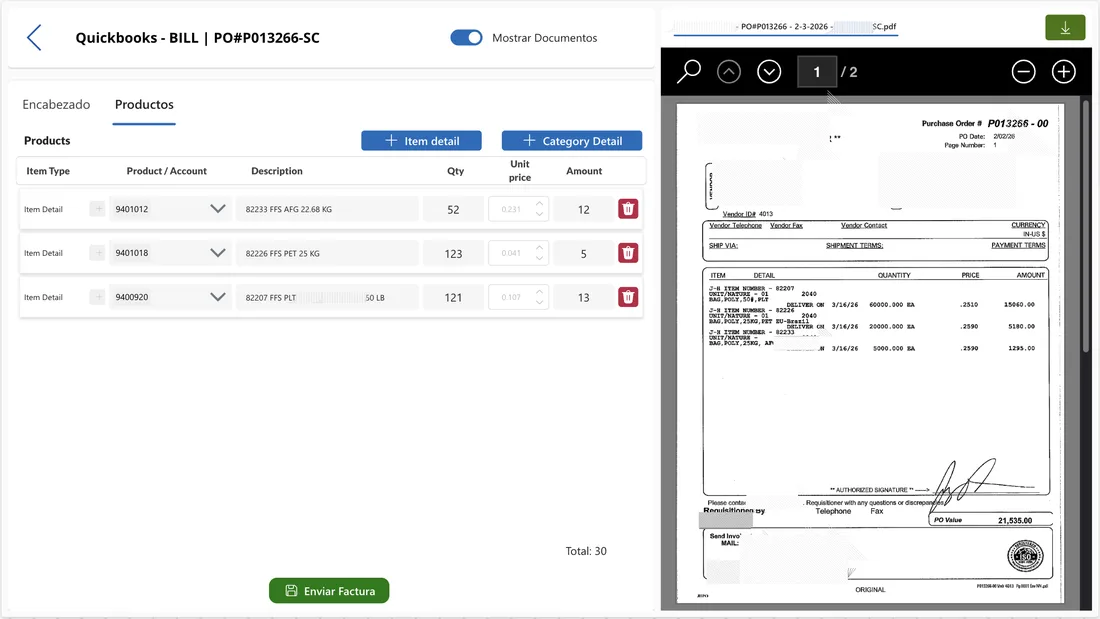

Within the ecosystem of applications I manage for an industrial packaging group, one of the most interesting projects was automating invoicing with Quickbooks. It wasn't just connecting two systems: it was redesigning a process that consumed hours of administrative work daily and generated errors that cost real money in accounting discrepancies.
The concrete problem: invoices processed manually
The company receives a considerable volume of vendor invoices daily in multiple formats: digitally generated PDFs, documents scanned from paper, emails with attachments, and occasionally photos taken with a mobile phone. Each invoice went through the same manual process: someone from accounts payable opened it, read the data (vendor, invoice number, product lines, quantities, prices), mentally compared it with the corresponding purchase order, manually entered it into Quickbooks, and archived the document.
The typical error wasn't entering a number wrong — it was subtler: applying a price from a previous contract, confusing one SKU with another similar one, or not detecting that the billed quantity didn't match what was received. Errors that were only detected at month-end, when it was already difficult to trace the origin.
AI Builder: data extraction with trained model
I implemented a document processing model in AI Builder specifically trained with real invoices from the group's main vendors. The model automatically extracts: invoice number, vendor data, date, product lines with description, quantity, unit price and total per line, subtotals, taxes, and grand total.
The accuracy after training with real data is high for vendors included in training. For new vendors or invoices with unusual formats, the model flags low-confidence fields for human review. It's not about eliminating supervision — it's about the team reviewing exceptions instead of entering data by hand.
The app: visual comparison invoice vs purchase order
I built a Power App that presents the accounts payable team with a split view: on the left, data extracted by AI Builder in structured format; on the right, the original PDF invoice. Below, the corresponding purchase order from the system for direct comparison. Discrepancies are highlighted automatically in red: if the billed quantity doesn't match what was received, if the price differs from the contract, or if there's a product that wasn't in the original order.
The team can approve with a button, edit fields that need correction, or reject the invoice automatically sending a notification to the vendor with the rejection reason.
Bidirectional QBO-SAP synchronization
The other component was synchronizing data between Quickbooks (accounting) and SAP (production). Products, prices, and inventory needed to be aligned between both systems. It couldn't be real-time synchronization — SAP had API restrictions and maintenance windows — so I designed Power Automate flows that execute periodic differential synchronization, detect conflicts (different price in both systems, product deleted in one but not the other), and notify the team when there are discrepancies requiring human decision.
Result
Invoice processing time was drastically reduced. Manual entry errors practically disappeared. And the accounts payable team went from chasing documents and typing numbers to managing exceptions and analyzing spending trends, which is where they really add value to the company.